
Mastering On-Device Mobile Web Inspection
Learn how to inspect DOM elements, edit CSS in real time, execute JavaScript in the REPL console, and monitor network waterfall requests directly on your Android phone without a PC or ADB.
9 Quick Steps to Debug Like a Pro
Everything you need to know from launching your first URL to exporting network request cURL commands.
Enter Any URL or Localhost IP
Type any web address in the top URL bar (e.g. https://example.com) or connect to local dev servers on your Wi-Fi (e.g. http://192.168.1.50:3000). Cleartext HTTP is fully supported.
Open & Resize the DevTools Dock
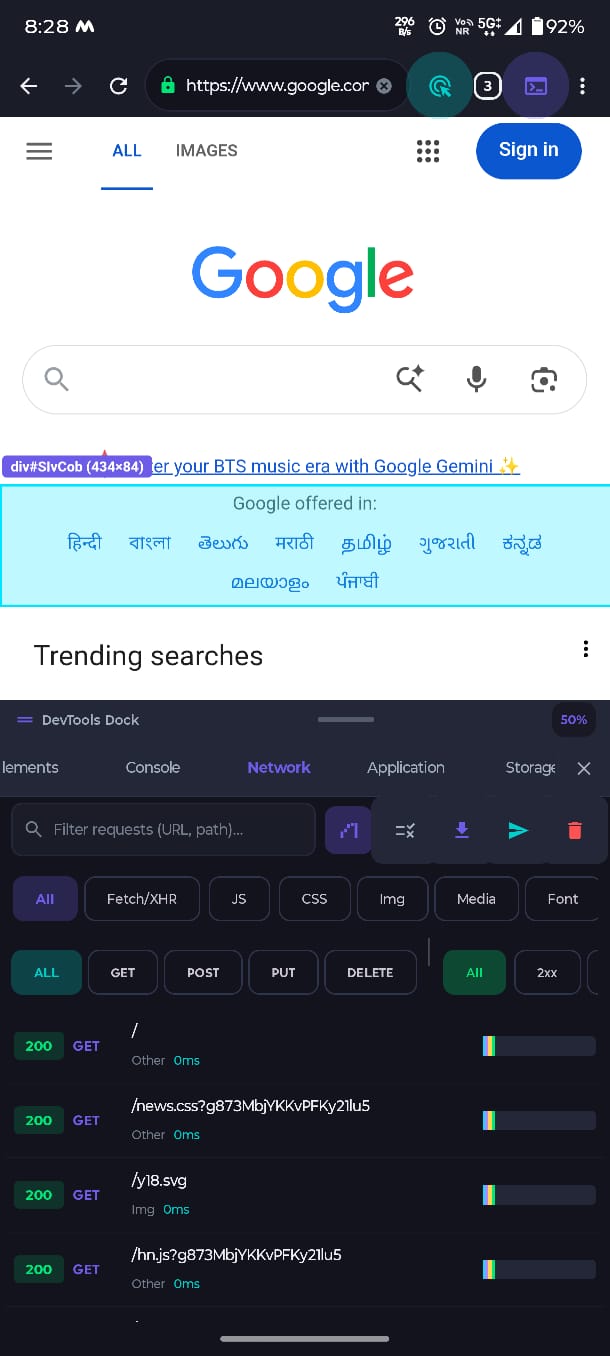
Tap the DevTools </> button in the top toolbar to toggle the developer panel. Drag the horizontal handle bar to resize the split view anywhere from 20% to 80% screen height.
Tap-to-Inspect Any Element
Tap the Target / Crosshair icon to activate Touch Inspect mode. Touch any element on the webpage to see its live dimensions, CSS class badges, tag name, and auto-navigate to it in the DOM tree.
Live Edit HTML & CSS Styles
In the Elements panel, tap on any HTML node to expand its child tags, or switch to the Styles sub-tab to edit colors, padding, display, and font sizes with immediate live visual feedback.
Execute JavaScript in the REPL Console
Switch to the Console panel to view console.log(), warnings, and unhandled runtime exceptions. Type any JS command or expression into the prompt to run it against the active page context.
location.href, document.title, or localStorage.
Analyze Network Waterfall & cURL Export
Open the Network panel to monitor real-time Fetch/XHR, CSS, JS, and image requests with latency timestamps. Tap any request to inspect headers, request payload, response body, and copy cURL scripts.
Manage Storage (Cookies & LocalStorage)
In the Storage panel, view and edit Key-Value pairs in localStorage, sessionStorage, and active session Cookies. Add, edit, or delete auth tokens and state values on the fly.
Emulate Devices & Hardware Fingerprints
From the three-dot menu, select "Hardware Fingerprinting & UA" to emulate iPhone, iPad, Pixel, or Windows Desktop viewports and User-Agent strings to test responsive mobile rendering.
Send Feedback Directly to Engineers
Found an edge case or want a Version 2 feature? Tap "Send Feedback" from the top menu or on this website. Our core developers read and iterate on all submissions directly.